 ORION
ORIONMake ORION yours.
Everything ORION looks like comes from a theme: the sky behind it, the glass, the colours, how round things are, the fonts and the sounds. A theme is a short text file. Write one in a few lines, give each tab its own, and watch every change happen live.
Three lines, five steps
A theme only says what it changes. Everything else comes from the theme it extends, ORION's own unless it names another.
- Make a text file, say
gold-rush.theme, with the lines on the right. - Copy it to the console's
/data/orion/themes/(over FTP, for example). - Open ORION and press R3 for Settings.
- Go to Appearance, then Theme for every tab (or Theme for the tab you are on, for that tab alone).
- Pick Gold Rush. Your own themes are marked (yours).
# gold-rush.theme
name = Gold Rush

[palette]
accent  = #ffc94a   # labels, counts, the cursor
primary = #ffc94a   # the selected tab, focused keys
You can also make one on the console: adjust the look in Appearance, then
choose Save as new theme and name it. ORION writes it to
/data/orion/themes/, where you can copy it off, edit it and share it.
See it before you leave Settings
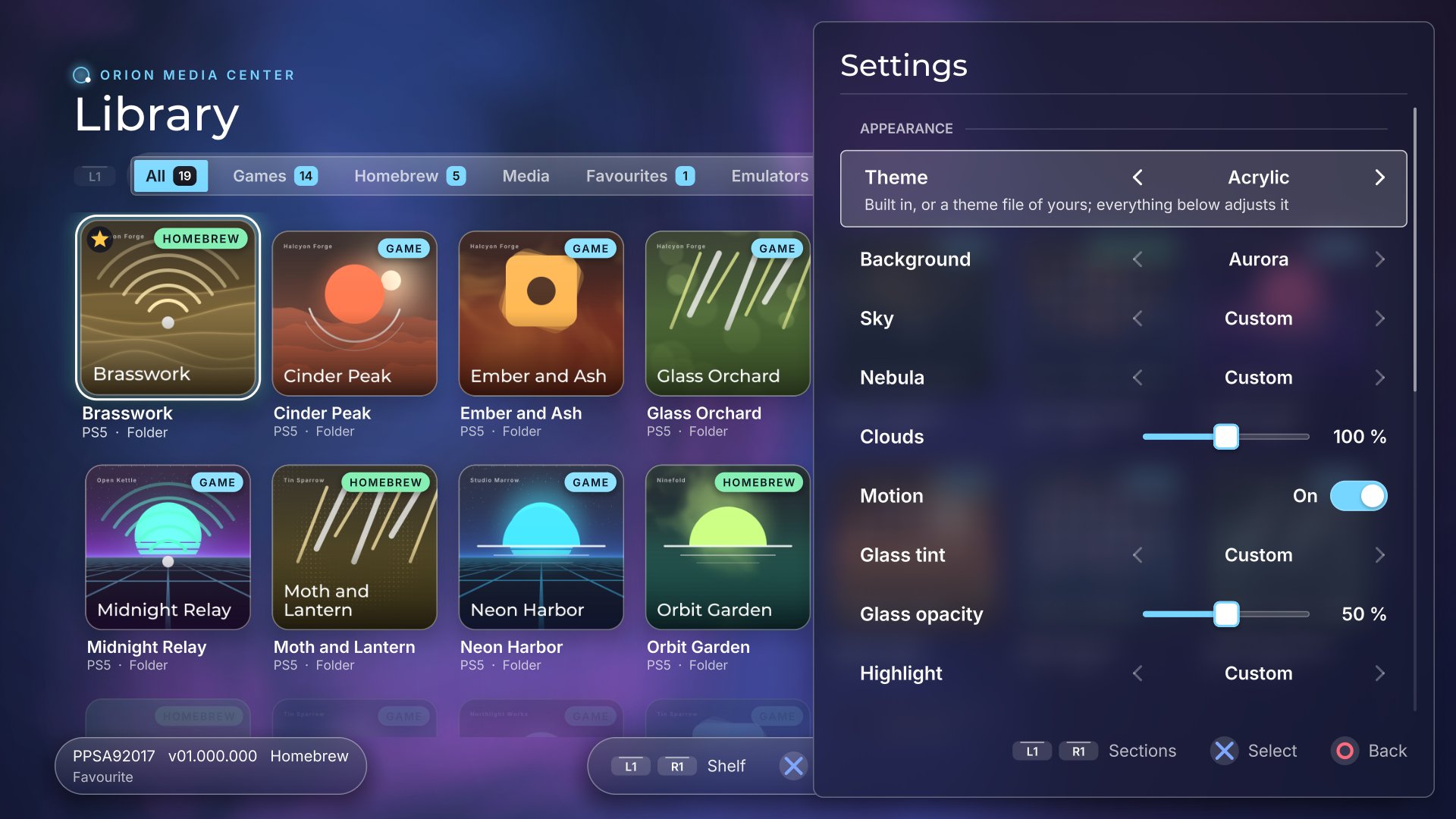
While you are in the Appearance rows, Settings narrows to a panel at the side and the library behind it shows each change the moment you make it: a new theme, background, sky, nebula, clouds, glass tint and opacity, highlight, accent, corners, tab style, focus ring and the rest.
Step back to the list of sections and Settings fills the
screen again. Your choices are saved as you go, in
/data/orion/theme.json, on top of the theme you picked.
Every tab can dress differently
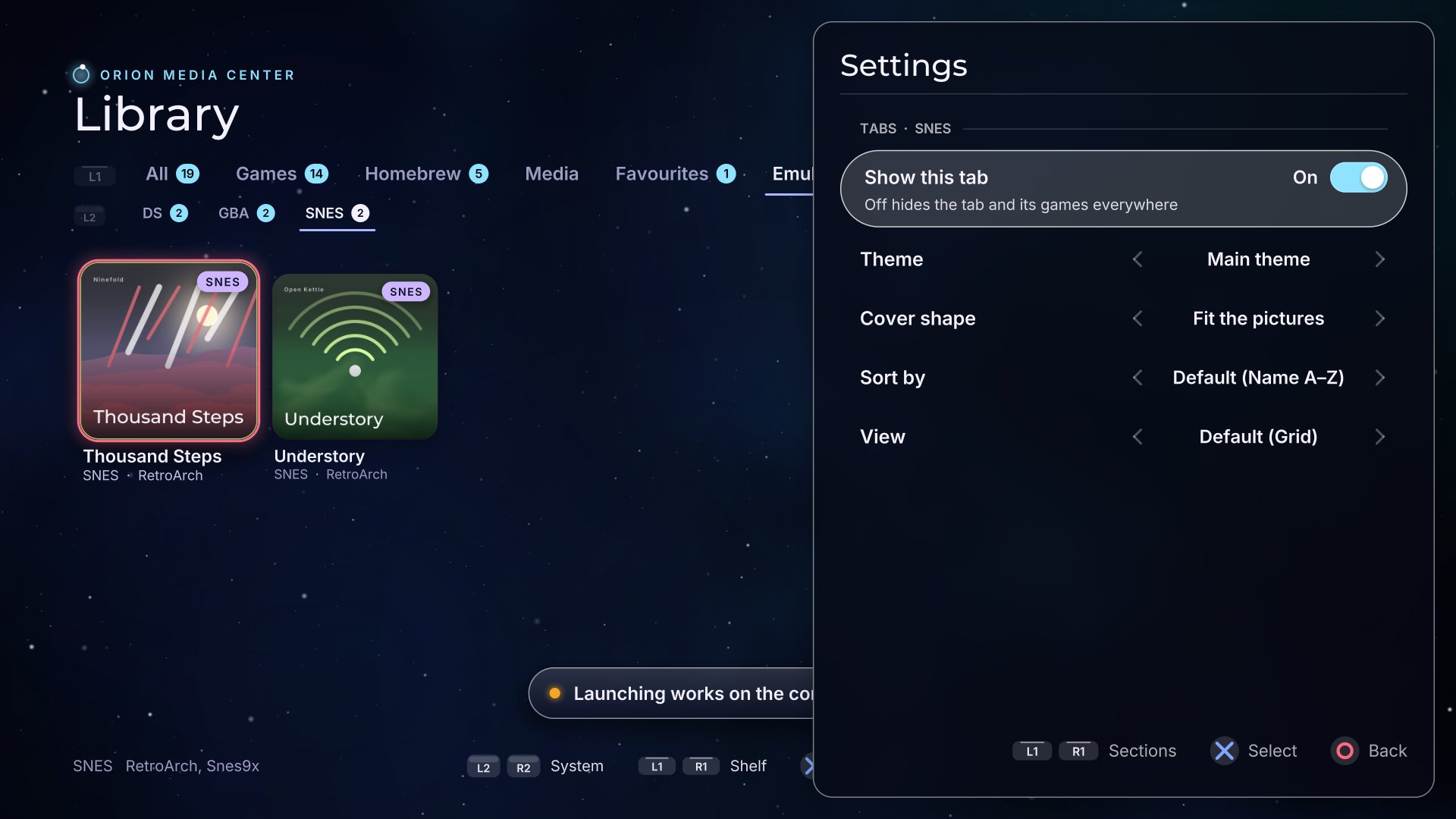
A Retro tab in Pixel, Favourites in gold, the SNES tab in something purple. On that tab, open Settings: the first row of Appearance is Theme for that tab. Or go to Settings, Tabs, pick the tab, then Theme. The rest of ORION keeps Theme for every tab and the rows under it.
On a tab's page the library behind Settings switches to that tab, so you see its theme, cover shape, sort and view as you choose them. Leave the page and ORION goes back to the tab you were on. Set a tab back to Main theme to make it follow Appearance again.
Systems count as tabs too: on the Emulators tab, each system (GBA, SNES, PS2, …) can wear its own theme.
Readable, forgiving, and nothing runs
A .theme file is lines of key = value, grouped under
[sections], with comments wherever you like. It is data, not a program: a theme
can change how ORION looks, never what it does.
The rules
- Keys before the first section belong to the theme itself:
name,id,author,description,family,extends,dark. - Each section is one group of keys:
[page],[palette],[shape],[type],[motion],[orion]. - A line starting with
#,;or//is a comment, and so is anything after#on a line. A colour such as#ffc94ais never mistaken for one. - Colours are
#rrggbb, or#rrggbbaawith an opacity from00toff. colorsandparamsare lists, separated by spaces or commas.true,falseand numbers are themselves; anything else is text. Quote text that holds#:author = "Ann # Bo".- No
id? It is made from the name: Nebula Noir becomesnebula-noir. - A key written twice keeps the later value. Numbers out of range are clamped; keys ORION does not know are ignored.
# nebula-noir.theme
name    = Nebula Noir   # shown in Settings
author  = you
extends = orion         # built-in or yours

[page]
background = galaxy
colors     = #000000 #02040b #3a1f6a #0a4a66

[palette]
surface = #140b2a80   # glass tint, 50 % opaque
accent  = #ffc94a
primary = #ffc94a

[shape]
radius_card = 30

[orion]
clouds        = 80      # percent
cover_corners = 28
tabs          = plain
focus_ring    = aurora
JSON works too. The built-in themes and
Save as new theme use .json with the same keys, each section an object
("palette": {"accent": "#ffc94a"}). ORION reads both from the same folder.
Every key
All optional except name. template.theme
has every one of them with ORION's own values, ready to copy.
The theme itself (before any section)
| Key | Value | What it does |
|---|---|---|
name | 1–40 characters | Shown in Settings |
id | 1–40 of a-z 0-9 - _ | Unique among your themes; made from the name when left out |
author, description | text | Who made it, one line about it |
family | text | The design language it belongs to |
extends | a theme id | Where every key it leaves out comes from: a built-in theme or one of yours (default orion) |
dark | true / false | Light controller glyphs for a dark page |
[page]: what is behind everything
| Key | Value | What it does |
|---|---|---|
background | a name | The animated backdrop, see Backgrounds |
colors | up to 4 colours | The backdrop's colours |
params | up to 4 numbers | Backdrop-specific settings |
color | colour | The page behind everything |
text, text_muted | colour | Text drawn straight on the page (the title, the tab names) |
[palette]: the colours of everything on it
| Key | ORION's | Used for |
|---|---|---|
surface | #0d102466 | Panels and cards; the alpha is the glass opacity |
surface_high | #ffffff1f | Tracks, chips, fields |
text, text_muted | #f6f4ff | Text on panels |
primary, on_primary | #a9b8ff | The selected tab, focused keys, and the text on them |
secondary, on_secondary | #ffffff1a | Secondary buttons and their text |
accent | #8fe3ff | Labels, counts, the text cursor |
outline, focus | #ffffff | Hairlines, and the focus ring |
shadow, light | #ffffff7a | Shadows, and the rim of the glass |
danger, success, warning | #e5484d | Delete, done, careful |
[shape]: how things are built
| Key | Value | What it does |
|---|---|---|
style | a style | The surface style, see Surface styles |
corner | round, chamfer, pixel | The shape of corners |
radius | 0–200 | Controls; 100 or more makes pills |
radius_card | number | Panels and dialogs |
border, button_border | number (−1: same as border) | Outline widths |
pill_chips, pill_switches | true / false | Fully round chips and switches |
shadow_offset, shadow_blur | number | The drop shadow |
focus_width, focus_gap | number | The focus ring's thickness and distance |
underline_fields | true / false | Text fields as an underline instead of a box |
[type], [motion]: letters and movement
| Key | Value | What it does |
|---|---|---|
heading, label | regular, semibold, display, mono, pixel, hand | The faces for headings and labels |
caps | true / false | Labels in capitals |
tracking | number | Extra space between label letters |
omega | number | How fast things move; 60 or more snaps |
damping | number | 1 settles, 0.5 bounces |
sounds | glass, paper | The sound effects |
[orion]: ORION's own pieces
| Key | Value | What it does |
|---|---|---|
clouds | 0–200 (%) | Nebula clouds drifting behind the glass |
motion | true / false | The background drifts, or holds still |
cover_corners | 0–48 | How round the covers are |
tabs | plain, pills | Home-screen text tabs, or pills on a frosted track |
focus_ring | aurora, theme | A ring of drifting colour, or the theme's own |
plates | none, outline, glass | Behind the bottom bars |
badges | true / false | GAME, HOMEBREW, MEDIA, PS4 banners on covers |
cover_rim | true / false | A hairline of light around each cover |
Backgrounds
Every background is animated and drawn by ORION itself. colors sets its
four colours, in the order below.
| Name | What it is | Its colours |
|---|---|---|
galaxy | A star field with a nebula (ORION's) | space, space, nebula, far nebula |
aurora | Slow, warped colour clouds | base, base, clouds, clouds |
waves | Layered ribbons | base, base, ribbons, ribbons |
bokeh | Drifting soft discs | base, base, discs, discs |
gradient | A gradient with a highlight; params 0–2 are its x, y and strength | top, bottom, highlight |
synthwave | A neon floor and a sun | sky, horizon, lines, sun |
dots | A dot matrix with a travelling pulse | base, base, dots |
vista | Parallax ridges under a sky; param 0 is the scroll speed | sky, haze, far ridge, near ridge |
paper | Warm paper with grain | paper, paper, light |
phosphor | CRT glass | dark, glow |
none | Only the page colour |
Surface styles
The style is most of what makes one design language different from another.
glass
ORION's: the screen behind, blurred and tinted with surface.
flat · soft · hard
Plain fills; soft shadows; hard offset shadows for neo-brutalism.
neumorphic · bevel · gloss
Pressed-in clay, a bevelled desktop, glossy skeuomorphic buttons.
outline · glow
Only the rims; rims that glow, for a sci-fi console.
pixel · sketch
Square 8-bit edges with a pixel face; hand-drawn lines on paper.
31 built-in themes to start from
Name any of these in extends and change only what you want. The id is
what goes in the file.
| Theme | id | Theme | id |
|---|---|---|---|
| ORION | orion | Acrylic | acrylic |
| Admin | admin | Blueprint | blueprint |
| Brutal | brutal | Candy | candy |
| Chakra | chakra | Classic | classic |
| Clay | clay | Code | code |
| Contrast | contrast | Crisp | crisp |
| Daisy | daisy | Enterprise | ant |
| Featherweight | light | Fresh | fresh |
| Friendly | friendly | Gloss | gloss |
| Hazard | hazard | Humane | humane |
| Layers | layers | Material | paper |
| Neutral | neutral | Pico | pico |
| Pill | pill | Pixel | pixel |
| Sketch | sketch | Soft | soft |
| Standard | standard | Tiles | tiles |
| Utility | utility |
Small files, big changes
# retro.theme: an 8-bit tab
name    = Retro Night
extends = pixel

[page]
background = synthwave
colors = #12002b #3b0a5e #ff3ea5 #ffb347

[orion]
cover_corners = 0
# paper.theme: light and calm
name = Notebook
extends = sketch
dark = false
[palette]
accent = #c2410c
primary = #1d4ed8
[motion]
sounds = paper# still.theme: ORION, holding still
name = Still Galaxy
[orion]
motion = false
clouds = 40
focus_ring = theme
badges = false
cover_rim = trueWhen a theme does not appear
A file ORION cannot use is skipped and the rest still load. Why is written to
/data/orion/themes.txt, with the line number for a .theme:
line 7: expected key = value.
Ids must be unique
Two themes with the same id: the second is skipped. A theme of yours cannot reuse a
built-in theme's id; extends it instead.
Size and count
A theme file can be up to 256 KiB, and ORION keeps at most 128 themes. Files end in
.theme or .json; anything else in the folder is ignored.